
I’ve spent the past year deep in the hardest parts of Model Context Protocol: authorization flows, security, and real client behavior. I keep seeing the same failure patterns over and over. Subtle bugs, runtime failures, and broken auth flows trip up even the best teams.
There’s a huge gap today between a server that “implements MCP” and one that clients can actually use. If you’ve ever wired up an MCP server and wondered why your agent can’t use it properly, you’re not alone!
I got tired of debugging these problems by hand, so I built MCP Debugger to do it for me.
Why MCP servers break
Reading the MCP spec is one thing. Implementing an HTTP server that real clients can talk to is another.
In my experience, things often go wrong in a few common areas:
- Authorization flows don’t work end-to-end. MCP depends on OAuth 2.1 and a dizzying array of extensions (PKCE, Protected Resource Metadata, Client ID Metadata Documents). If any one link in the chain is broken, clients can’t connect. Getting everything just right takes trial and error.
- Tool metadata is missing or ambiguous. A server might return tools without robust descriptions or without parameter types, so the agent has to guess what to pass… and guesses wrong.
- Frameworks have spec gaps. Most devs use an MCP server framework to jump-start their projects, but some frameworks have incomplete spec coverage that the developer never notices until a client tries to connect in the wild.
To make matters worse, the MCP spec has been evolving quickly, especially around authorization and security. These changes are good, but keeping up with a moving target is hard and many tradeoffs are not yet well-documented.
Introducing MCP Debugger
I built a tool that interacts with your server the same way a real MCP client would, and reports what happens. Give it a server URL and it will:
- Connect and authorize as a real MCP client
- Discover the server’s tools and inspect their metadata
- Run protocol-level validation checks
- Report exactly where things deviate from what agents expect
The result is a report that tells you what would cause an agent to fail… before the problem actually occurs.
Try it out
Head over to mcpdebugger.dev, paste your server URL, and get a report in a few seconds:
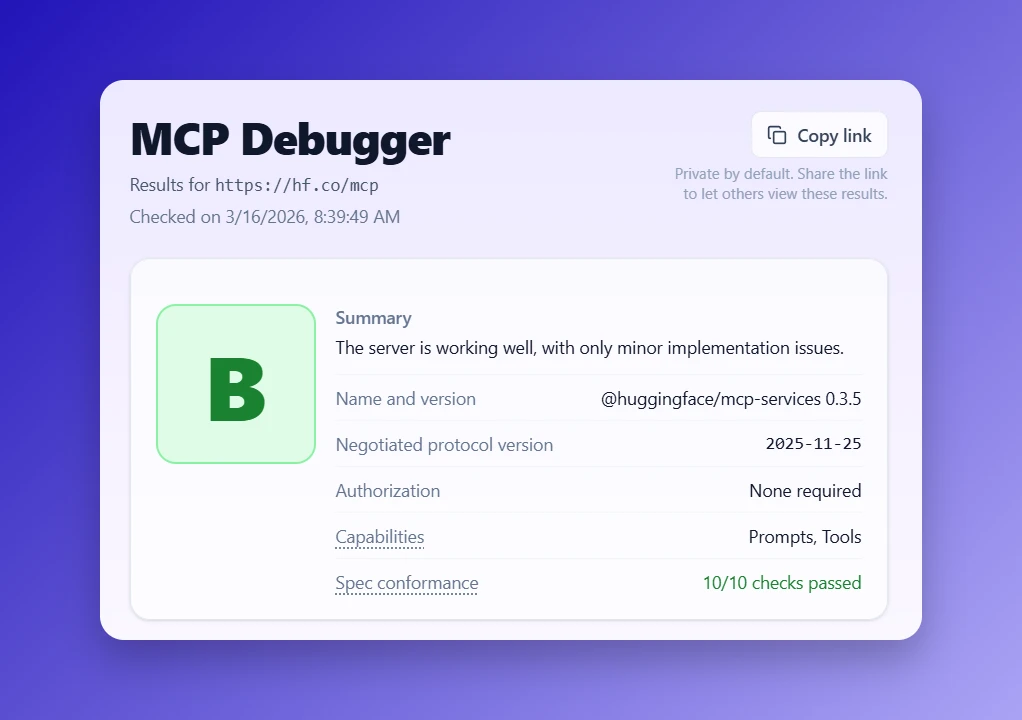
This is an early release and the checks will evolve as the ecosystem grows.
What could make this tool more useful? I’d love to hear your ideas! Reach me on X or LinkedIn.